TL;DR
I'm running HiDream-O1-Image Full as a persistent local server integrated into a Studio UI. The official recipe — 2048x2048 / 50 steps / guidance 5.0 — produces beautiful results, but each image takes around 33 seconds. That's too slow for iterative exploration.
So I held the prompt and seed constant and swept steps, guidance, and resolution. The sweet spots were clear.
| Config | Time | vs. Official |
|---|---|---|
2048 / 50 steps / g5 | 33.37s | 1.00x |
2048 / 28 steps / g5 | 18.41s | 1.81x |
1536 / 20 steps / g5 | 7.14s | 4.67x |
1024 / 20 steps / g5 | 3.83s | 8.71x |
The takeaway: explore direction at low resolution and low steps, then do the final render at full quality. In particular, 1536x1536 / 28–36 steps hits a very good speed-quality balance.
Motivation
Once image generation is embedded in a UI, iteration speed matters more than peak quality.
The real workflow isn't "generate one perfect image." It looks like this:
- Check composition, mood, outfit, background direction
- Tweak the prompt slightly
- Try different seeds
- Re-render only the promising candidates at full quality
Waiting 30+ seconds per generation makes that loop painful. Being able to see rough candidates in 5–10 seconds is a completely different experience.
The goal here isn't "the best single image" — it's understanding how far you can cut exploration cost without breaking quality in a meaningful way.
Environment
- GPU: NVIDIA RTX PRO 6000 Blackwell Max-Q (96 GB VRAM)
- Model: HiDream-O1-Image Full (8B, bf16)
- Inference server: Custom Python HTTP server with model kept resident
- Measured: One
/generate/t2irequest after model load - Seed:
42 - Prompt:
A cinematic portrait photo of a woman in a rainy neon street,
detailed skin, 85mm lens, realistic lighting, high detail
All comparison images use the same prompt and seed. Only steps, guidance_scale, resolution, and resolution snapping are varied.
| Parameter | Value |
|---|---|
| prompt | A cinematic portrait photo of a woman in a rainy neon street, detailed skin, 85mm lens, realistic lighting, high detail |
| seed | 42 |
| mode | t2i |
| dtype | bf16 |
| negative prompt | none |
| sampler / scheduler | HiDream pipeline default |
I used a portrait because hair, skin, background light, and fine detail are easy to compare. That said, a young woman's face has relatively little texture and wrinkle detail to begin with, so it's actually a forgiving subject for low-step generation — I'll come back to that.
Images in this article are contact sheets with results side by side. Pixel-peeping is easier at full resolution, but for UI-driven exploration the first question is "does this look worth keeping?" — so I've prioritized at-a-glance comparison here.
Start by Reducing Steps
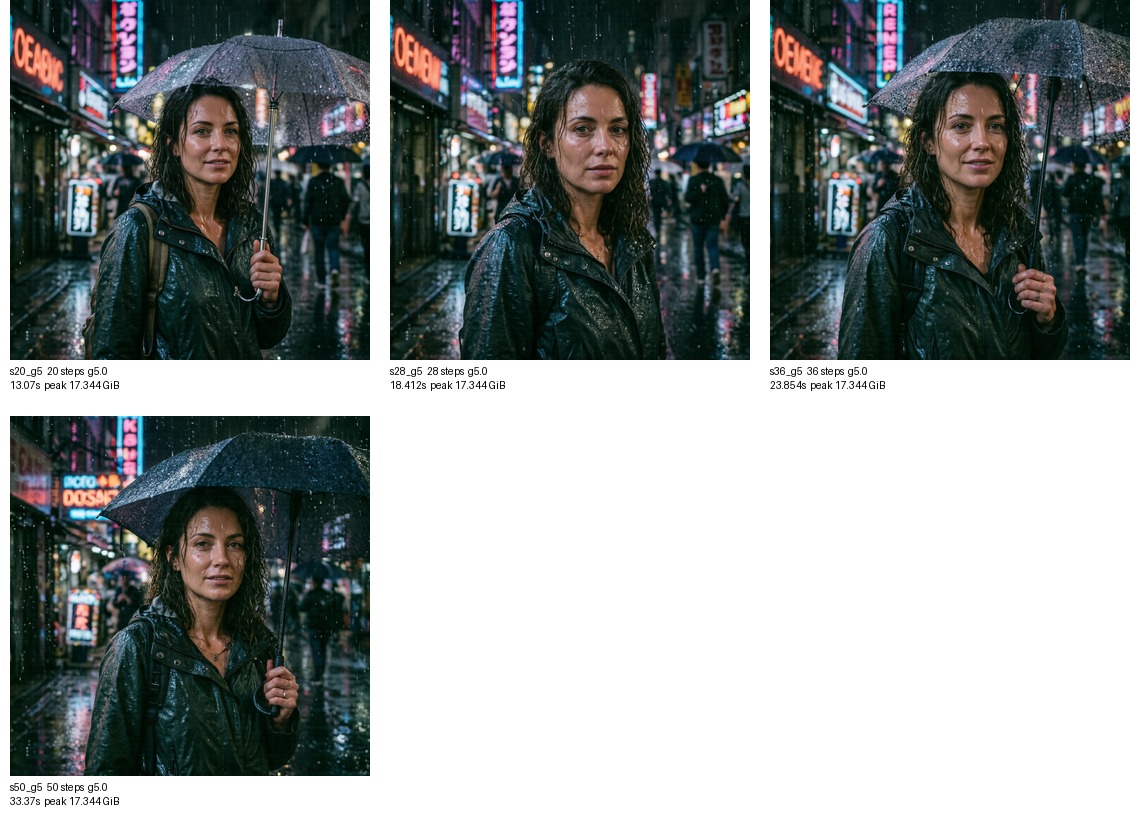
Fixed guidance=5.0 and 2048x2048, varied only steps.
| Resolution | Steps | Guidance | Elapsed | Speedup vs 50 steps |
|---|---|---|---|---|
| 2048x2048 | 20 | 5.0 | 13.070s | 2.55x |
| 2048x2048 | 28 | 5.0 | 18.412s | 1.81x |
| 2048x2048 | 36 | 5.0 | 23.854s | 1.40x |
| 2048x2048 | 50 | 5.0 | 33.370s | 1.00x |
Pretty much theoretical scaling. In this HiDream path, when guidance > 1.0, both conditional and unconditional forwards run, so reducing steps translates directly to lower latency.
Visually: 20 steps shows some roughness. 28 steps looks fine at first glance, though fine detail thins out under comparison. 36 steps holds up well for most use cases.
guidance=1.0 Is Significantly Faster
Next I varied guidance as well, comparing practical preset candidates.

| Preset | Resolution | Steps | Guidance | CFG | Elapsed |
|---|---|---|---|---|---|
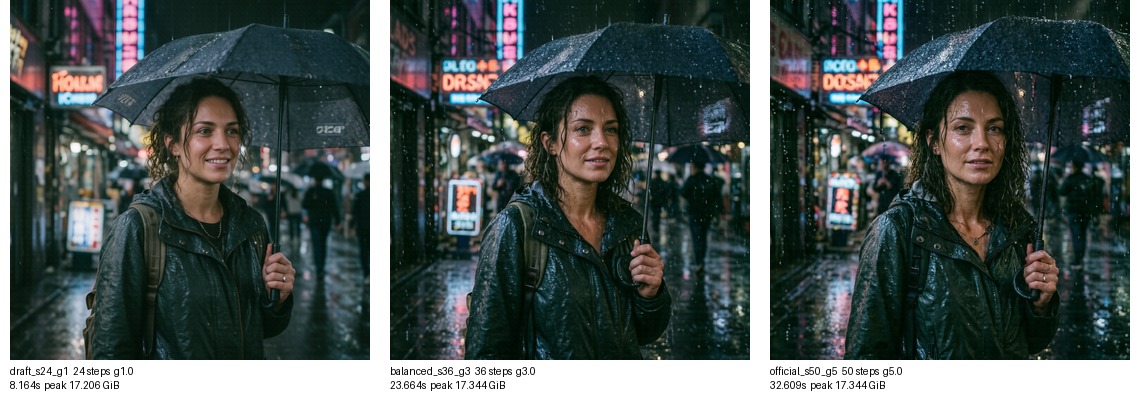
| Draft | 2048x2048 | 24 | 1.0 | off | 8.164s |
| Balanced | 2048x2048 | 36 | 3.0 | on | 23.664s |
| Official | 2048x2048 | 50 | 5.0 | on | 32.609s |
guidance=1.0 effectively disables CFG, so it's faster than step count alone would suggest — 24 steps lands in the 8-second range.
The trade-off is that lower guidance changes prompt adherence and overall aesthetics. Fine for idea validation, but for prompts involving text, specific clothing details, or precise multi-element placement, staying at guidance=3–5 is safer.
The Resolution Trap: Requesting 1024 Doesn't Make It Faster
My first instinct was to just pass width=1024, height=1024 and get a faster result. But the official pipeline doesn't use the requested resolution directly — it snaps to the nearest fixed aspect-ratio bucket.
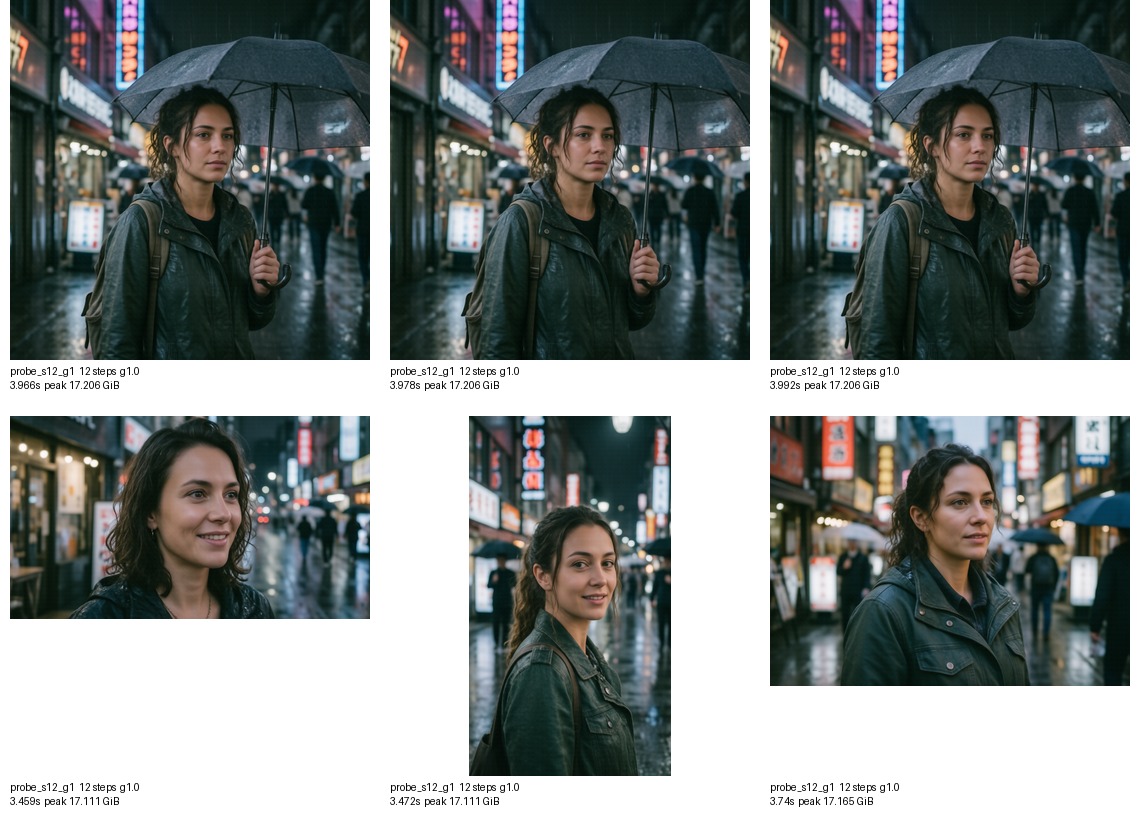
Measured results:
| Requested | Actual |
|---|---|
| 512x512 | 2048x2048 |
| 1024x1024 | 2048x2048 |
| 2048x2048 | 2048x2048 |
| 1280x720 | 2560x1440 |
| 720x1280 | 1440x2560 |
| 1024x768 | 2304x1728 |
Sending 1024x1024 from the UI does nothing — square aspect ratios all resolve to 2048x2048. The snapping logic lives in models/utils.py under PREDEFINED_RESOLUTIONS, and it seems intentionally designed to favor output stability.
Bypassing Buckets for True Low-Resolution Generation
For experimentation I added a snap_resolution=false flag that bypasses the pipeline's resolution snapping. For safety, arbitrary resolutions are constrained to:
- width and height aligned to 32px
- 256px minimum
- max 4.3MP total
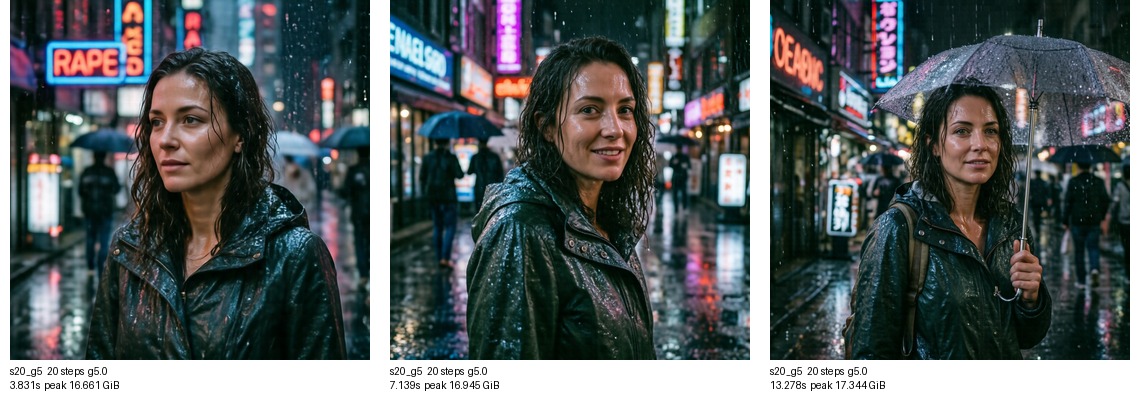
Comparing 1024 / 1536 / 2048 at 20 steps / guidance=5.0:
| Resolution | Elapsed | Speedup vs 2048 |
|---|---|---|
| 1024x1024 | 3.831s | 3.47x |
| 1536x1536 | 7.139s | 1.86x |
| 2048x2048 | 13.278s | 1.00x |
This is where the real gains are. Given that the official 2048 recipe sits at 30+ seconds, 1536 + 28 steps should land around 10 seconds — a completely different feel.
1024 is fast but noticeably lower in information density. Good for directional checks, but probably too rough for regular output use.
Presets in the Studio UI
Based on these results, here's what I settled on in the Studio UI:
| Use case | Resolution | Steps | Guidance | When to use |
|---|---|---|---|---|
| Quick preview | 1024x1024 | 20–24 | 1.0–3.0 | Composition / mood check |
| Standard | 1536x1536 | 28–36 | 3.0–5.0 | Day-to-day |
| High quality | 2048x2048 | 36–50 | 5.0 | Re-render of selected candidates |
| Official bucket | bucket | 50 | 5.0 | Match upstream recipe exactly |
Steps and resolution are independently selectable in the UI. The workflow is: explore with 1024 / 24 steps, then re-render promising results at 1536 or 2048 with the same prompt and seed.
Cases Where Quality Degradation Shows Up
With this portrait, the difference between 28 steps and 50 steps was "visible under comparison" — not obvious at a glance. But part of that is the subject matter.
Low steps and low resolution tend to hurt most with:
- Older faces, wrinkles, skin texture
- Hands, fingers, jewelry
- Fabric with fine patterns
- Text in signs or books
- Multiple people
- Busy indoor scenes with lots of background objects
Conversely, young faces, simple backgrounds, and soft lighting are forgiving — low-cost settings hold up well.
That's why a single fixed preset isn't the right design. Giving users control over exploration cost depending on what they're generating is the better approach.
Reproduction Commands
The benchmark script lives at image_server/bench_quality_speed.py. It calls the HTTP API after the model is already resident, so model load time is excluded from all measurements.
./image_server/start_image_server.sh
Steps comparison:
python3 image_server/bench_quality_speed.py \
  --prompt "A cinematic portrait photo of a woman in a rainy neon street, detailed skin, 85mm lens, realistic lighting, high detail" \
  --seed 42 \
  --variant s20_g5,20,5 \
  --variant s28_g5,28,5 \
  --variant s36_g5,36,5 \
  --variant s50_g5,50,5
Resolution comparison:
python3 image_server/bench_quality_speed.py \
  --prompt "A cinematic portrait photo of a woman in a rainy neon street, detailed skin, 85mm lens, realistic lighting, high detail" \
  --seed 42 \
  --variant s20_g5,20,5 \
  --size 1024x1024 \
  --size 1536x1536 \
  --size 2048x2048 \
  --no-snap-resolution
Summary
HiDream-O1-Image Full is excellent at its official settings but too slow for iterative use. When you break down steps, CFG, and resolution separately, the speedups are clean and predictable.
- Steps scale almost linearly with time
guidance=1.0drops CFG and gives a large speed boost- The official pipeline snaps resolutions to fixed buckets
- True low-resolution generation at 1024/1536 is dramatically faster
1536 / 28–36 stepsis the practical sweet spot
For image generation UIs, low-cost exploration → high-quality final render is a much better flow than starting at maximum quality every time. This experiment gave me a solid basis for building exactly that.