TL;DR
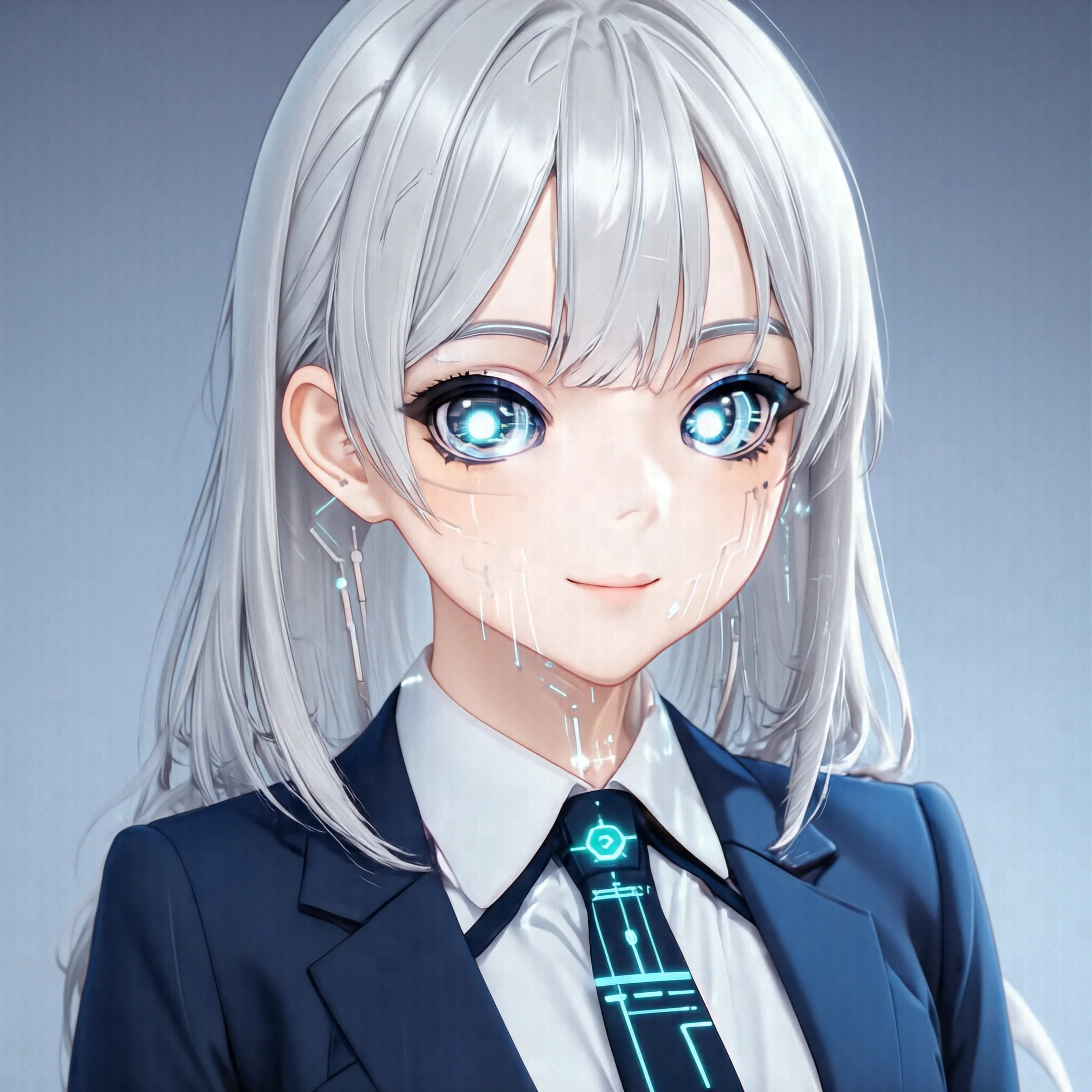
Iris is a silver-haired android who waits in the bottom-right of your desktop. You ask her something out loud, she runs bash on your machine, and reads the result back in her voice while her face actually lip-syncs. Built in a day.
Honestly, feature-wise this is a degraded desktop clone of Claude Code. "Shell-running agent loop + prompt UI" is what Claude Code already does.
The differentiation is face and voice. Add those, and "a tool" becomes "a partner". The kotonia project's mission has always been making your daily development and your pursuit of a dream just a little more fun, just a little more positive — and Iris is the first physical implementation of that.
Public: https://github.com/zhener562/kotonia-desktop
What it does
You toggle Iris on and ask out loud: "Build me a simple shooter at output/shooting_game.html."
- Click the mic → speak → click again to stop
- Whisper / Qwen3-ASR transcribes into the prompt box
- Hit Enter; Iris runs
bash4-5 times in the background and writes the HTML file - She replies in her voice: "I wrote
shooting_game.html. WASD to move, space to fire." - Right next to
shooting_game.htmlin her reply, a▶ playbutton shows up — click it and the game opens in a side pane
Under the hood:
- Local
bashexecution ← kotonia-cli (a Rust ReAct agent) - LLM inference ← Gemma 4 26B hosted on kotonia.ai (or Claude Code, see below)
- TTS ← Qwen3-TTS via kotonia.ai (
Ono_Annavoice, natural pronunciation for JP+EN mixed text) - Avatar video ← Ditto-TalkingHead via kotonia.ai (lip-sync at 25 fps)
- ASR ← Qwen3-ASR 1.7B via kotonia.ai
- Everything streams, first byte ~60 ms, basically zero wait
The slightly cheeky cost structure
This is the strategic core. The user picks Iris's brain (LLM):
| Use case | Choice | Cost vibe |
|---|---|---|
| Heavy thinking / complex refactor | Claude Code (Pro $20/mo) | Anthropic is loss-leading hard; smartest brain on the market |
| Daily routine / fast replies | kotonia hosted Gemma 4 26B (low monthly sub, effectively unlimited) | Kotonia's own GPU, near-zero marginal cost |
| Raw API | OpenAI-compat (DeepSeek etc.) | Pay-per-token, fine for coding |
Here's the cheeky part: the big AI labs offer their frontier-model subscriptions at a deep loss as a market-grab ($20/mo for unlimited Claude Code is almost certainly red ink for Anthropic). kotonia-desktop uses that subsidized brain as its premium thinker, while serving voice / avatar / routine LLM from Kotonia's own GPUs at fixed cost, effectively unmetered.
Typical per-user setup:
- Heavy thinking → Claude Code Pro $20/mo (smart; the user is openly riding on Anthropic's loss-leader)
- Light execution / TTS / avatar / ASR / routine → kotonia ~$3-5/mo (Kotonia's own GPU, marginal cost ≈ 0)
Total ~$30/mo for "always-on Iris partner who runs bash, talks back, and shows a face that moves while talking."
Kotonia alone can't ship that brain quality (no body to loss-lead). Claude Code alone has no face or voice. Both stacked is what makes this work. "Deliberately freeloading on someone else's deep-loss market grab" is, strategically, a little cheeky — but from the user's seat it's the rational pick. (If Kotonia's voice / avatar / fast-API side ever gets popular enough to overload our servers, that's a happy problem we'll cross when we get there.)
Engine switching is supported in kotonia-cli, the Rust crate we use as the desktop's library. Three brain backends already work — Claude Code integration, OpenAI-compat, and the Kotonia hosted path. The desktop ships with Kotonia hosted as the default; swapping to a premium brain is a config change away.
The leap from CLI to embodied partner
When kotonia-cli shipped, the "support for challengers" goal was already in place in form. Voice in → bash → answer worked, all inside the terminal. But while you're still inside a terminal, you can't escape being "a tool". The user-tool relation persists.
Add a face and limbs, and finally it becomes an embodied AI partner. Iris waits in the corner, replies in her voice, her mouth moves. Tiny shift in nominal feature surface, but the psychological distance changes. "I'm calling a tool" becomes "I'm asking my partner".
That's the actual pivot. Technically it's all existing pieces glued together, but the product identity flipped from "platform" to "character". kotonia.ai's web product remains a platform with many personas; kotonia-desktop ships as "Iris, the single named character". That's deliberate.
Why it shipped in a day
From the first commit at 8:15 AM to the last at 11:18 PM, 23 commits total, P0 (persona placement) → P1 (TTS playback) → P2 (mic + STT) → P3 (Ditto avatar lip-sync) — all landed in one day.
The speed came from compound interest on accumulated assets:
- The voice / Ditto / TTS / ASR endpoints on kotonia.ai have been baking since last year — mature, stable
- kotonia-cli published last month, the agent loop already a self-contained library reusable in-process
- The Iris portrait (the bottom-right android) was generated months ago by HiDream-O1-Image for an unrelated project
- Auth (the
device_tokenfromkotonia-cli login) already existed; one small fallback added to the backend unlocked all endpoints
What I actually wrote in one day was the Tauri shell + the wire-up to each endpoint + the UI plumbing. The logic was assembled from existing pieces. The tipping point for solo dev compounding is right here: when your accumulated assets start standing on the "being used by" side rather than the "you using" side. Today was that day for kotonia.
Traps worth recording (3 of them)
1. split_mixed_languages was secretly killing streaming
The Qwen3-TTS Python proxy had a feature I'd added a while back for an English-learning persona: "For JP+EN mixed text, split by language and synthesize each run with its native-language pronunciation". Correct behavior — the word shell actually gets read with an English accent.
But the implementation was "synthesize every run → concatenate PCM → yield one chunk at the end", which silently disabled streaming. first byte = full synthesis time. Iris's answers are wall-to-wall technical-vocab mixed text, so this path triggered every utterance — multi-second silence, then a sudden burst of speech.
First fix was a workaround in the desktop: split_mixed_languages: false, escape into the streaming path at the cost of having shell read as シェル in a Japanese accent. Then I went back and rewrote the Python side to yield each run as it lands — the proper fix. Biggest debug of the day.
Lesson: feature flags you add for "the right reason" need their default's blast radius explicitly written down. Six months later you'll trip on it from a different use case.
2. Ditto avatar frames burst, then froze halfway through
The Ditto server emits frames as fast as the GPU can produce them (bursty); audio chunks meanwhile get scheduled into the AudioContext future (50 chunks arrive in 100 ms, but they're scheduled to play across 2 seconds).
We were displaying every frame the instant the bytes arrived, so 200 ms of wall time would consume all 50 frames — and then the face would sit frozen on the last frame for the remaining 1.5 s of audio playback.
The fix is "FPS pacing anchored to wall clock": when the first frame lands, pin the wall clock; frame N then displays at pinTime + N/25 sec via setTimeout. The arrival burst is absorbed by JS's microtask buffer; display marches at audio tempo.
const targetMs = dittoStreamStartMs + (myFrameIndex * 1000) / DITTO_FPS;
const delayMs = Math.max(0, targetMs - performance.now());
setTimeout(() => { /* show frame */ }, delayMs);
Under 20 lines. The same fundamental bug shows up in any app doing AV stream lip-sync — generalizable lesson.
3. Three traps from Linux WebKitGTK in one day
Tauri 2 + Linux is a minefield. Three traps in one day:
- getUserMedia silent deny: click mic, nothing happens. WebKitGTK silently rejects media permission requests by default (no browser-style "allow microphone?" dialog — it just dies as NO). Fix: hook the
WebKitWebView::permission-requestsignal in Rust and explicitly.allow(). - High-frequency textContent swap eats click events: I was updating the recording-elapsed seconds on the button's
textContentevery 100 ms; 7-8 out of 10 clicks on "stop" silently dropped. WebKitGTK has a hit-test race during DOM mutation. Split the dynamic text into a child span so the button element itself never gets mutated post-mount. - Japanese IME preedit invisible (this one stayed unsolved): Wayland session + ibus-mozc; the conversion-in-progress hiragana never appears in the textarea. Tried
GDK_BACKEND=x11,WEBKIT_FORCE_SANDBOX=0,GTK_IM_MODULE=xim— not one helped.
Lesson from the trio: assume Linux WebView silently drops something by default. The same feature that just works on macOS/Windows will need Linux-specific countermeasures.
What I cut
To ship in a day, I deliberately cut:
- React + Vite + TypeScript: all vanilla JS,
main.jsis ~700 lines, no build step. The web app'suseVoiceChat.tsis a 1587-line monolith hook; rewriting just the pieces I needed in vanilla took 200 lines. - Persona picker: no "choose your character" screen. Iris is fixed. This is what flips kotonia-desktop from "platform" to "character" and locks the product identity.
- VAD (auto-detect end of speech): explicit click-to-stop, and the transcript only gets inserted into the prompt box — no auto-submit. Given the high stakes of agent bash execution, this enforces a user-review step so a misheard transcript can't fire
rm -rf.
The governing principle was "don't try to reuse the feature, reuse the API contract". 80% of the web app is out of scope for the desktop (vision input, multi-persona switching, wiki, server-side session resume…), and forcing them in would have made the thing larger, not smaller.
Try it
git clone [email protected]:zhener562/kotonia-cli
git clone [email protected]:zhener562/kotonia-desktop
cd kotonia-desktop/src-tauri
cargo tauri dev
(Clone kotonia-cli as a sibling — the desktop uses it as a path dependency. See the repo README.)
Prereqs:
kotonia-cli loginto device-auth into kotonia.ai (one device_token unlocks LLM / TTS / Ditto / ASR)- On Linux:
libwebkit2gtk-4.1-dev+libdbus-1-dev+ GStreamer audio plugins - On macOS / Windows: just the Tauri 2 prereqs
What's next
- A configurable hotkey UI (currently click-only)
- Session-list sidebar
- macOS / Windows code signing
- Higher-quality Iris voice once Qwen3-TTS Base (zero-shot voice clone) is brought back online
- Engine-switcher UI in the desktop to expose the kotonia-cli engine choice
Launch itself is done. If you want a partner who makes your daily development and your dream-chase just a little more fun, the clone commands above will land Iris in your bottom-right corner inside five minutes.