Summary
On mobile PageSpeed Insights (PSI), the kotonia.ai landing page scored 56 with a 7.5-second LCP. In one day it changed like this:
| Before | After | |
|---|---|---|
| PSI score (mobile) | 56 | 95 |
| FCP | 2.0s | 0.8s |
| LCP | 7.5s | 3.6s |
| LCP "element render delay" | 2,050ms | 250ms |
| CLS | 0.317 | 0 |
| Images loaded on the landing page | 54MB | 2.2MB |
The score of 56 is from before any work. The "before" FCP and LCP are from the first PSI run after the images were already shrunk. CLS is from our own measurement. All of these are lab numbers; real-user data (CrUX) isn't in yet. CrUX is a 28-day aggregate, so I'll append it when it arrives.
What I want to write about is less the numbers themselves and more which changes worked and which didn't.
Shrinking images 25x didn't make the page render sooner
The first thing we found was image weight. Character card images were served at full size: 54MB on the landing page alone. A thumbnail was loading a 6MB image.
We made the server resize them. Add a width like ?w=640 and it rounds up to one of five steps (160 / 320 / 640 / 960 / 1280) and resizes. Resized images are kept in memory, up to 64MB. The landing page's images came to 2.2MB in total.
At the same time we started fetching the first card's image before the JS (more below). With the network throttled to 1.6Mbps and the CPU slowed 4x:
| Image arrives | JS ready | LCP | |
|---|---|---|---|
| Before | 8.7s | 6.0s | 8.7s |
| After | 1.1–1.3s | 6.2–6.4s | 6.2–6.5s |
The image arrives in about a second, yet LCP won't go below 6 seconds. LCP isn't when the image arrives; it's when the image is painted.
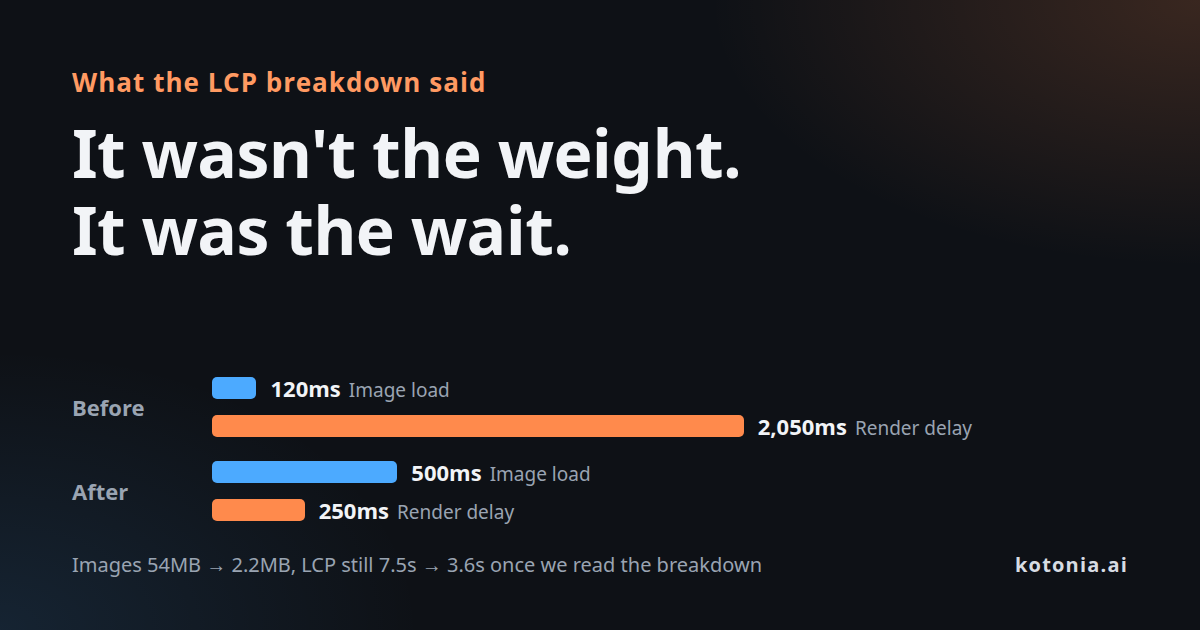
PSI said the same thing. After fixing fonts, LCP was still 7.5 seconds, and the breakdown looked like this:
- Image load: 120ms
- Element render delay: 2,050ms
The image had long since arrived. The problem was the order of things before it got painted:
- Load the JS
- The JS calls the character-list API
- When the list arrives, draw the carousel
No amount of image shrinking shortens that serial chain. "Slow because it's heavy" and "slow because it's waiting" are different problems, and the LCP breakdown tells you which one you have right away. This time we fixed the weight before looking at the breakdown.
A measurement cut off too early said "it's already fast"
There's one more embarrassing mistake. I did this work with an AI agent (Claude Code). The first time I had it measure with Playwright, the report came back: "The landing page is already fast. LCP is 1.4–2.0 seconds."
It was wrong. The measurement stopped five seconds after the load event, and the 6MB image hadn't arrived by then. An image that hasn't arrived isn't an LCP candidate, so the heading text was reported as LCP instead. The slowest thing was outside the measurement window, which made the page look fast.
When you measure LCP yourself, always print which element was the LCP before you stop measuring. If it's heading text, suspect that a bigger image simply hasn't arrived yet.
Data overturned "show the #1 character first"
To break the chain, we needed to show the carousel's first card without waiting for JS and the API. That means deciding which character goes first at the HTML stage.
The plan was to show the most popular character first. Before doing that, though, we looked at clicks on the landing page:
- About 20% of landing sessions pressed "next" and flipped through the cards
- The characters in 3rd–4th place led to more than twice as many conversations and sign-ups as the #1 character shown first
The first card wasn't what made people stay. So there was little reason to pin #1. We made it random.
Random seems like a bad fit for a Next.js build that writes static HTML: pick one character at build time and everyone sees the same one. So we did this:
- At build time (
getStaticProps), embed only the "character ID and image ID" of the top 8 in the HTML - A small script in
<head>picks one per visit and preloads its image - The same script puts that image's URL into a CSS variable on the
<html>element - The loading placeholder (static HTML) draws that CSS variable as its background
// The script _document embeds in <head> (condensed)
var c = [[12, 345], [7, 210] /* … */];          // [character ID, image ID]
var f = c[Math.floor(Math.random() * c.length)];
var w = window.innerWidth <= 700 ? 640 : 960;
var u = '/api/public/personas/media/' + f[1] + '?w=' + w;
var l = document.createElement('link');
l.rel = 'preload'; l.as = 'image'; l.href = u;
l.setAttribute('fetchpriority', 'high');
document.head.appendChild(l);
var h = document.documentElement;
h.style.setProperty('--landing-cover-image', 'url("' + u + '")');
h.setAttribute('data-landing-cover', '');
.heroCarouselCard.heroCarouselCoverPlaceholder {
  display: none;
  background-image: var(--landing-cover-image);
  background-size: cover;
}
:global(html[data-landing-cover]) .heroCarouselCard.heroCarouselCoverPlaceholder {
  display: block;
}
The key is writing to <html>. React doesn't manage <html>, so a script adding attributes there can't cause a hydration mismatch. Once the API list arrives, the carousel starts from the same character the script picked.
Only numeric IDs go into the HTML, never character names or descriptions. We have a policy of not exposing user-created characters to search engines, and this keeps out of its way.
With this, the "element render delay" in LCP went from 2,050ms to 250ms, and LCP from 7.5s to 3.6s.
Incidentally, the background didn't show up in the first version. A later .heroCarouselCard { background: #0b0f15 } shorthand was resetting background-image to none. Raising the specificity to two classes fixed it.
For fonts, one @import line was the culprit
The 2.0s FCP came from a Google Fonts @import inside our CSS. It made a serial chain of "HTML → our CSS → Google's CSS → the font files", on a fresh connection to another domain.
Switching to self-hosting with next/font/google brought FCP to 0.8s. Two caveats:
- We set
preload: falsefor the Japanese variable font (Noto Serif JP). Preloading all of it is heavy in itself - Places in CSS Modules that name the font directly don't match the names
next/fontgenerates. We had to route everything through CSS variables
Caching HTML on Cloudflare rewrote our browser TTL
Finally, we put the HTML on Cloudflare's edge. Nearly 80% of visits come from outside Japan, yet the HTML alone made a round trip to a server at home every time (JS and CSS were already at the edge).
The cache rule: "everything except /api/, one day at the edge, purge all on every deploy". That's where we stepped on a trap.
If you don't set a browser TTL, the zone default (4 hours) rewrites the HTML's cache-control: no-cache into max-age=14400. Browsers then reuse the HTML for 4 hours, so a deploy plus an edge purge doesn't reach users. Worse, the old HTML points at hashed JS that no longer exists, so the whole page breaks.
Setting the rule's browser TTL to "respect origin" fixed it. It's easy to check: run curl -I and see whether cache-control is still the value you set.
Other decisions:
- Exclude
/api/from caching. Other people's API responses would sit at the edge, and the ignore-query-string setting would break?w=640images - Purge the whole zone through the Cloudflare API right after each deploy, with a separate token that can only purge
- Keep the previous build's JS for 7 days, so that in the few seconds before the purge, and in tabs that were already open, old HTML fetching old JS doesn't get a 404
Takeaways
- Look at the LCP breakdown (load delay, load, render delay) first. It tells you whether you have a weight problem or a waiting problem
- When measuring yourself, print which element was the LCP. A suspiciously fast number may mean the slow thing is outside your window
- "What to show first" had to be decided for speed anyway. When we looked at the data before deciding, the assumption was backwards
- If you cache HTML on a CDN, check that the browser TTL is still the origin's value
What we don't know yet
- Real-user LCP, INP and TTFB (CrUX), including whether TTFB from outside Japan dropped
- Whether the randomized first card increased or decreased conversations and sign-ups
- Desktop width and the character-list page haven't been re-measured
- PSI was run once per state, so there's run-to-run variance
I'll append to the end of this article once the real-user numbers and the carousel results are in.