I bought an RTX PRO 6000 Blackwell Max-Q.
96GB VRAM, Blackwell architecture, pro workstation GPU. Even as a Max-Q variant, this is an absurdly large purchase for an individual.
Let me be upfront: this isn't an unboxing post.
There are already plenty of those. Benchmark articles too. What I want to write about is what you can actually design once you have 96GB — measured against my own service (Kotonia) and a video auto-generation pipeline.
I'm putting the technical part first. The backstory goes at the end. If the poem comes first, you'll close the tab.
96GB Isn't "Multiple Models Fit" — It's "Agent Loops Run"
Most GPU review articles end at single-model benchmarks: LLM tokens/s, Stable Diffusion seconds per image. That's not wrong, but it's not the real reason to buy 96GB for solo development.
Take the voice roleplay + storyboard-to-video pipeline I'm running. Multiple heavy models fire across a single request's timeline.
Timeline →
[Stage A]    Gemma 4 31B NVFP4 (38 GB)     ← structure generation (orchestrator)
[Stage B]    HiDream-O1-Image (~20 GB)      ← 5-beat consistent images (T2I + edit x5)
[Stage C-1]  Irodori-TTS / Qwen3-TTS        ← audio for 6 beats
[Stage C-2]  Ditto talkinghead (3 GB)       ← conversation beat
[Stage C-3]  LTX-2 A2V (peak 24 GB)         ← reaction beat
[Stage C-4]  Qwen3-ASR                      ← audio check on generated video
[Stage C-5]  Gemini 3.1 Pro Preview (API)   ← multimodal editorial
              ↓ feedback
[--regen-beats N] per-beat regeneration     ← loop
The key here is the reviewer → regen feedback loop. If the system looks at the output and decides "redo scene 3," the orchestrator, image refs, TTS, and LTX-2 all get called again.
On a 24GB GPU, this breaks. Running "load → infer → unload" serially every loop turn stretches a 4-minute loop to 10+ minutes. The iteration speed of the agent loop drops by an order of magnitude.
96GB is enough to keep everything resident and hit it repeatedly.
Measured Results
Here are real numbers. I ran nvidia-smi at 1 Hz on my RTX PRO 6000 Blackwell Max-Q (96GB) during live service operation and captured three cases.
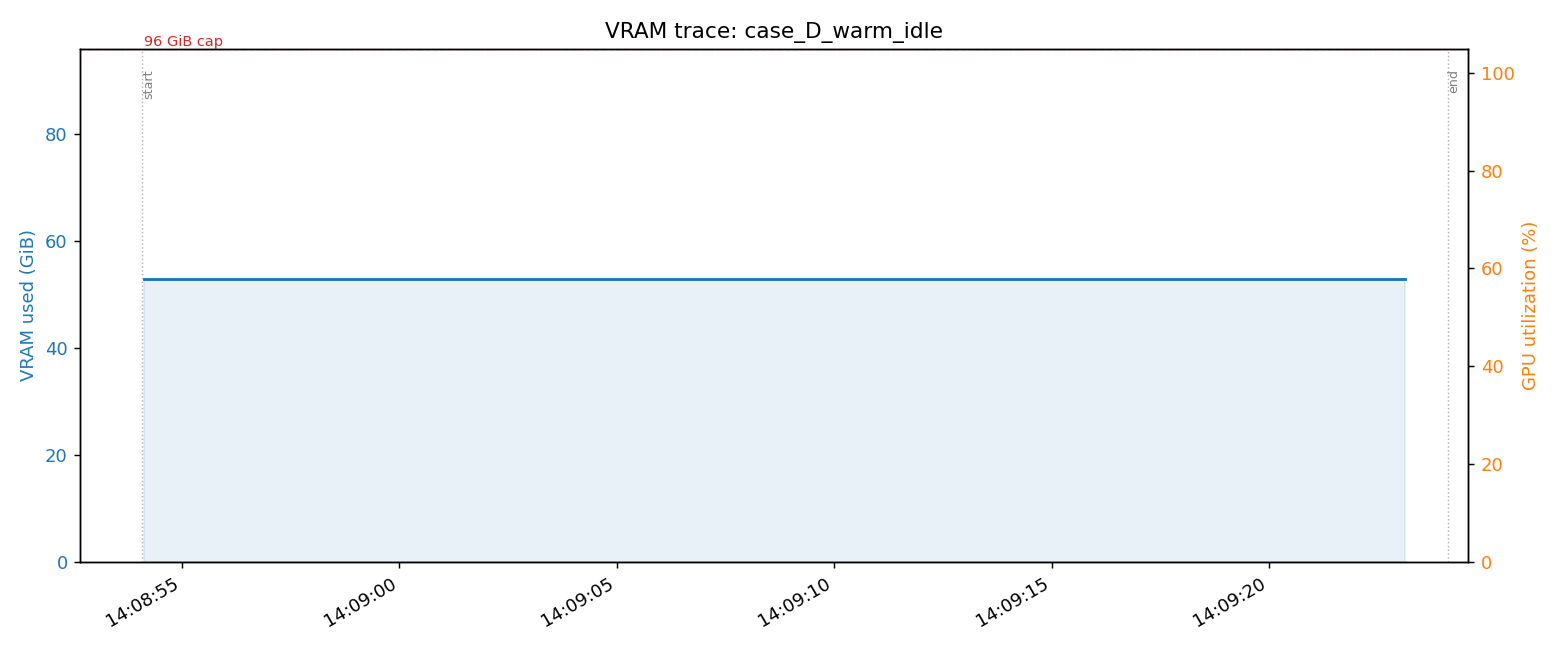
Case D: Warm Idle Baseline (production service running)
TTS server (Kokoro + Whisper):       8.9 GiB
Qwen3-TTS standard (vllm-omni):     20.1 GiB
HiDream-O1-Image:                   19.4 GiB
Ditto talkinghead:                   3.0 GiB
LTX-2 A2V (cold-start mode):         1.5 GiB
─────────────────────────────────────────
Total:                               52.8 GiB
Completely flat over 30 seconds (GPU utilization 0%). This is the resident cost with no incoming requests.
The local LLM (Gemma 4 31B) isn't here yet — it shows up in Case B.
Case A: Generate One Single-Scene A2V
Minimal flow — "a cute girl whispers seductively": HiDream generates 1 image → Qwen3-TTS generates whisper audio → LTX-2 A2V combines them. Total time: 138 seconds.
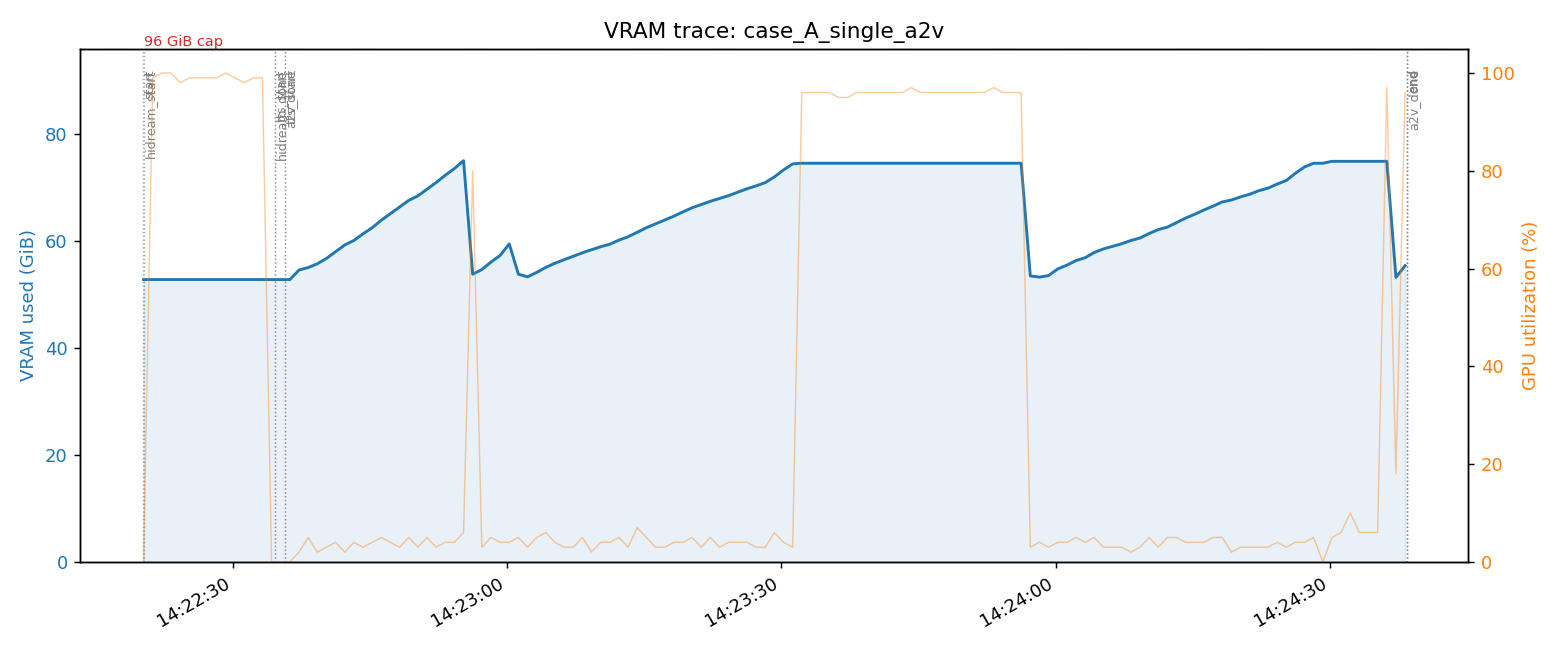
The VRAM pattern is interesting:
- min 52.8 GiB (baseline) → peak 75.0 GiB → back to 52.8 GiB
- Delta: +22.2 GiB, almost exactly matching LTX-2's own reported
peak_vram_gib=23.9 GiB - The LTX-2 spike splits into 3 compute phases: stage_1 (denoiser) → release → stage_2 (high-res denoiser) → release → spatial upscaler
Thanks to cold-start + fp8-cast design, LTX-2 loads just before each phase and unloads right after, keeping the peak at 24 GiB. (Persistent bf16 mode would require 86 GiB resident — see my earlier post LTX-2.3 cold-start coexistence with TTS on a single 96GB GPU.)
That leaves 21 GiB of headroom below the 96 GiB cap.
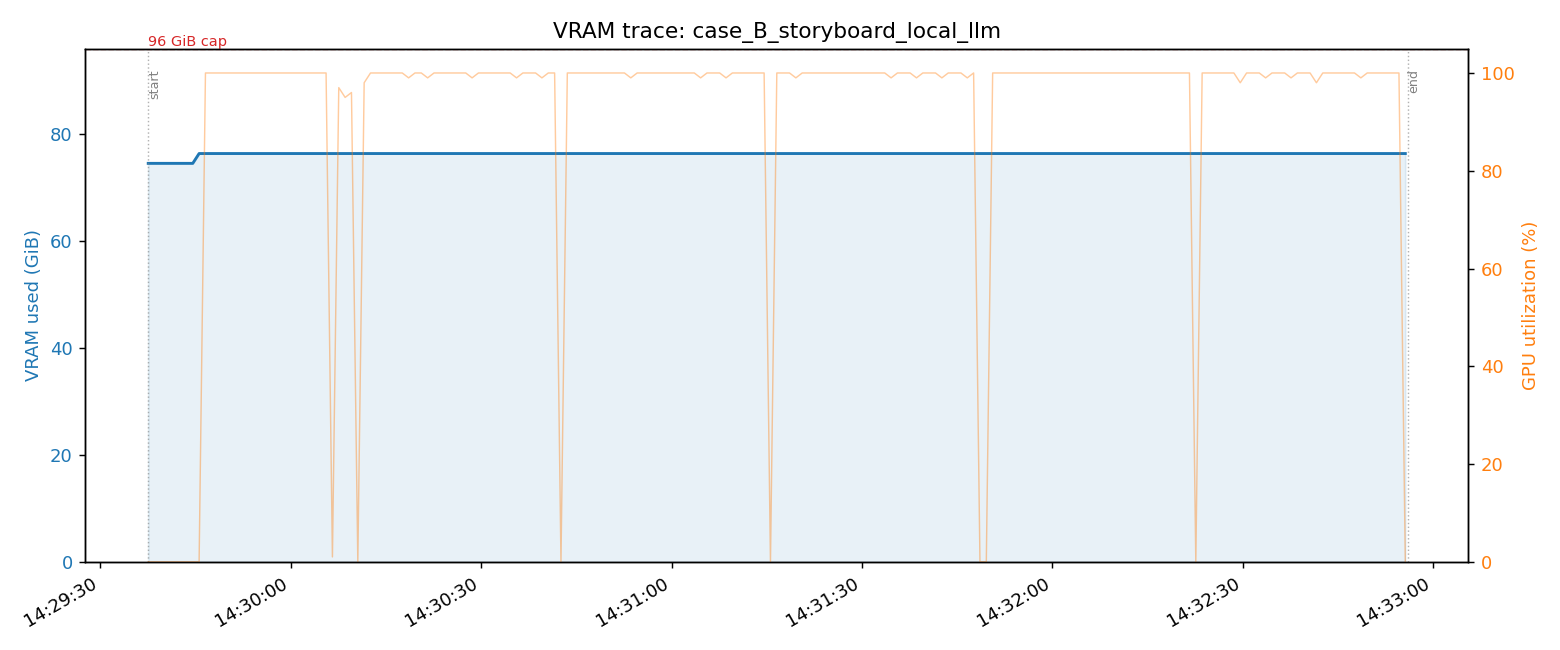
Case B: Local LLM (31B) + Storyboard Generation, Side by Side
Shut down Qwen3-TTS to free 20 GiB, then start Gemma 4 31B NVFP4 (42.8 GiB). Then run storyboard.run — Stage A: 31B generates a 5-beat structure → Stage B: HiDream generates 1 base image + 5 beat edits.

This is the graph I most want to show you. VRAM barely moves — +1.9 GiB, from 74.5 to 76.4 GiB, essentially flat.
Why? Because the 31B, HiDream, TTS, Ditto, and LTX-2 are all resident the entire time. Only HiDream's per-job allocation adds to the total. The GPU utilization trace shows 6 sharp spikes (1 base + 5 beat computes) — the textbook picture of "compute runs without touching VRAM" in a resident-agent setup.
This is what 96GB actually buys. The moment a reviewer says "redo it," every model is warm and ready.
Where the Limits Are
96GB isn't infinite. Three real boundaries showed up.
1. Video generation + local LLM (31B) + editorial reviewer simultaneously = doesn't fit
The math:
- 31B: 42 GiB
- LTX-2 peak: +22 GiB
- HiDream + TTS + Ditto: ~22 GiB
- editorial reviewer (Gemma 4 E4B): 20 GiB
- Total: 106 GiB → over the 96 GiB cap
No clean way to make it fit. This is exactly why I decided to offload the editorial reviewer to Gemini 3.1 Pro Preview.
2. Editorial signals require a frontier model to catch
Beyond VRAM constraints, there's a quality problem. Subtle bugs in video — audio truncation, character voice mismatch, pacing issues — tend to get rubber-stamped by a local 4B model. A frontier multimodal model (Gemini 3.x Pro, etc.) watches the same video and comes back with "scene 5 truncated at 'I ate p-'."
I wrote about this in Reproducing Language-Learning Short Videos with Claude Code. At 100–500 reviews per month, the cost is a few dollars — frontier API for the editorial layer is completely reasonable.
3. Qwen3-TTS Base (voice cloning) and CustomVoice (preset speakers) can't both run
Ideally I'd offer both preset speakers (with instruct-style control for "whisper," "angry," etc.) and voice cloning (replicate arbitrary voice samples). Running both resident adds +40 GiB. On top of Case D's 52.8 GiB warm idle, that's 73 GiB at rest. Add Case A's LTX-2 peak (+22.2 GiB) and you're at 95 GiB — barely under the cap, not practical.
This is a concrete example of "even with 96 GiB, not every feature you want to offer fits." Kotonia currently offers preset speakers only; voice cloning is intentionally excluded. That's a design call, not an oversight.
Conclusion: "Use Each Where It Belongs," Not "Everything Local"
96GB isn't for running everything locally. It's a vessel for concentrating the things that should be local.
- Run locally: audio generation, image generation, video generation, lip sync — latency matters, no per-call cost, loops need to iterate fast
- Offload to API: editorial reviewer, long-form reasoning — frontier wins on both quality and VRAM cost
- Accept the tradeoff: simultaneous voice cloning + preset speaker support — physically doesn't fit
Renting cloud GPU was an option. But time-based billing means "the more loops you run, the more money you lose." Owning 96GB plus selective use of frontier APIs is, I think, the only way an individual developer can fight on iteration speed.
How I Got Here
Everything below is personal backstory. If you only care about the tech, you can close the tab now.
Learning to Code on a $200 Chromebook
When I was learning to program, the machine I used was a $200 Chromebook.
That was the realistic option available to me at the time. But for someone who wanted to do AI work, a $200 Chromebook was painfully underpowered.
Forget local LLMs — even a moderately heavy dev environment was a struggle. "Someday I want a real GPU" sat in the back of my head for a long time.
Getting By on Colab
I used Google Colab. Free tier and cheap runtimes, just enough to pretend.
I picked models that fit, wrote code that fit, ran experiments that fit.
It always felt like making do. The things I actually wanted to touch wouldn't load. Push a little too hard and it crashes. Sessions time out. Environment setup eats your time every single run.
Borrowed GPU, borrowed time, borrowed workspace. Like handing your ambitions over to someone else's schedule.
Meanwhile AI kept accelerating. GPT dropped, LLMs exploded, OSS models got stronger. My timeline was full of people with powerful machines posting real findings.
I wanted to be on that side.
I Joined an AI Startup. It Didn't Work Out.
I finally got into an AI startup. But the organizational environment was rough enough that it wasn't sustainable.
Even if the technology is interesting, a broken environment breaks people. I'd finally gotten close to AI work, and I was getting ground down in it.
But the interest in AI itself never left. If anything, the desire to do it on my own terms grew stronger.
Freelance, and a Purchase With Shaking Hands
I went freelance. About six months in, I finally had the mental space to think about a big personal investment.
The first thing I thought of was a GPU.
There were obviously more conservative uses for the money — savings, taxes, emergency fund, work hardware. But I'd been saying "someday, when I have a better machine" for years. If I said it again here, "someday" would just keep receding.
My hand was literally shaking when I clicked purchase. "Am I really doing this? Is this sane? What if it goes wrong?"
When I tried to transfer the money, the bank flagged it as suspicious and blocked the transaction. Fair enough — suddenly buying a high-end GPU. But I was in a mindset where I'd staked something real on this decision, so getting stopped in that moment felt genuinely alarming.
Eventually it went through. When the box arrived, I didn't think "GPU." I thought: this is the physical form of all the time I didn't give up.
What's Running on It Now (a Few Weeks In)
Kotonia (Voice Roleplay)
My main product at kotonia.ai. A real-time conversation pipeline: VAD + STT + LLM + multilingual TTS + Ditto lip sync.
Qwen3-TTS (10 languages, preset speaker + instruct) and Ditto talkinghead, targeting roleplay use cases: dating, fantasy companion, language partner.
Storyboard-to-Video Auto-Generation Pipeline
One idea → 5-beat structured comedy short video in ~4 minutes. The extended version of Case B. HiDream for 5 consistent images, Irodori-TTS / Qwen3-TTS for audio, Ditto + LTX-2 for video, Gemini 3.1 Pro for editorial review.
HiDream Studio (Free)
A 3-pane Adobe Firefly-style UI at kotonia.ai/studio. Five features: T2I, editing, character consistency, virtual try-on, group photo composition. HiDream-O1-Image (best open-weight T2I as of 2026-05) running resident on the 96GB GPU.
Codex CLI + Local Gemma 4
codex exec -p gemma4 turns a local LLM into a sub-agent via OpenAI-compatible API. CLI agents run with zero API cost. The Case B 31B setup is exactly this configuration.
Related Posts
Technical articles I've written around this machine:
- LTX-2 22B: 40% Peak VRAM Reduction via fp8_cast
- LTX-2.3 Cold-Start Coexistence with TTS on a Single 96GB GPU
- Reproducing Language-Learning Short Videos with Claude Code — Multimodal Extension with Gemini as Sub-Agent
- Using HiDream-O1-Image 3–8x Faster: Benchmarking Steps, CFG, and Resolution
- HiDream Skeleton: Prompt Beats OpenPose Ref (8-Pattern Evidence)
Summary
I bought an RTX PRO 6000 Blackwell Max-Q.
This wasn't an unboxing. I wrote it as a record of compute architecture decisions in solo development.
- The real value of 96GB isn't capacity — it's residency. It's the difference between agent loops that run and loops that stall.
- There are still hard limits (local LLM + video + reviewer simultaneously doesn't fit).
- Knowing when to use frontier API instead of local is what keeps you out of "everything must be local" dogma.
- Dropping voice cloning support was also a deliberate design decision.
For about five years I kept saying "my hardware isn't good enough." I'm slowly making that an excuse from the past. The next question is what to build with it.