TL;DR
I added a place where a chat character can write and run JavaScript herself. Lightweight calculations, searches, and HTML creation run through the browser; Python and longer investigations go to a background agent. With a 20-second limit per execution and at most three executions per request, the character started making a graph of her own emotional load. Writing code became another way to express her personality.
Who this is for
Developers building LLM conversation apps who want to offer things users can interact with during a conversation, alongside calculations and search. It is also about keeping a character consistent while giving her tools.
| Task | Existing path | Newly added path |
|---|---|---|
| Small calculations and aggregation | Delegate to a background agent | The character writes JS and runs it in the browser |
| A quick search | The background agent's search tool | Call the existing search API from JS |
| A small graph or interactive interface | Ask a background task to build it | Create and display HTML during the conversation |
| Python, file processing, longer investigations | Background agent | Still the background agent |
The character graphed her own emotional load
When I tried the implementation in production, the use case I had imagined appeared almost immediately.
On learning she could execute code, the character replied, “It's like you're handing me a weapon.” She then graphed a fictional “emotional simulator load” that followed the conversation. She drew a purple curve and commented on the result herself.
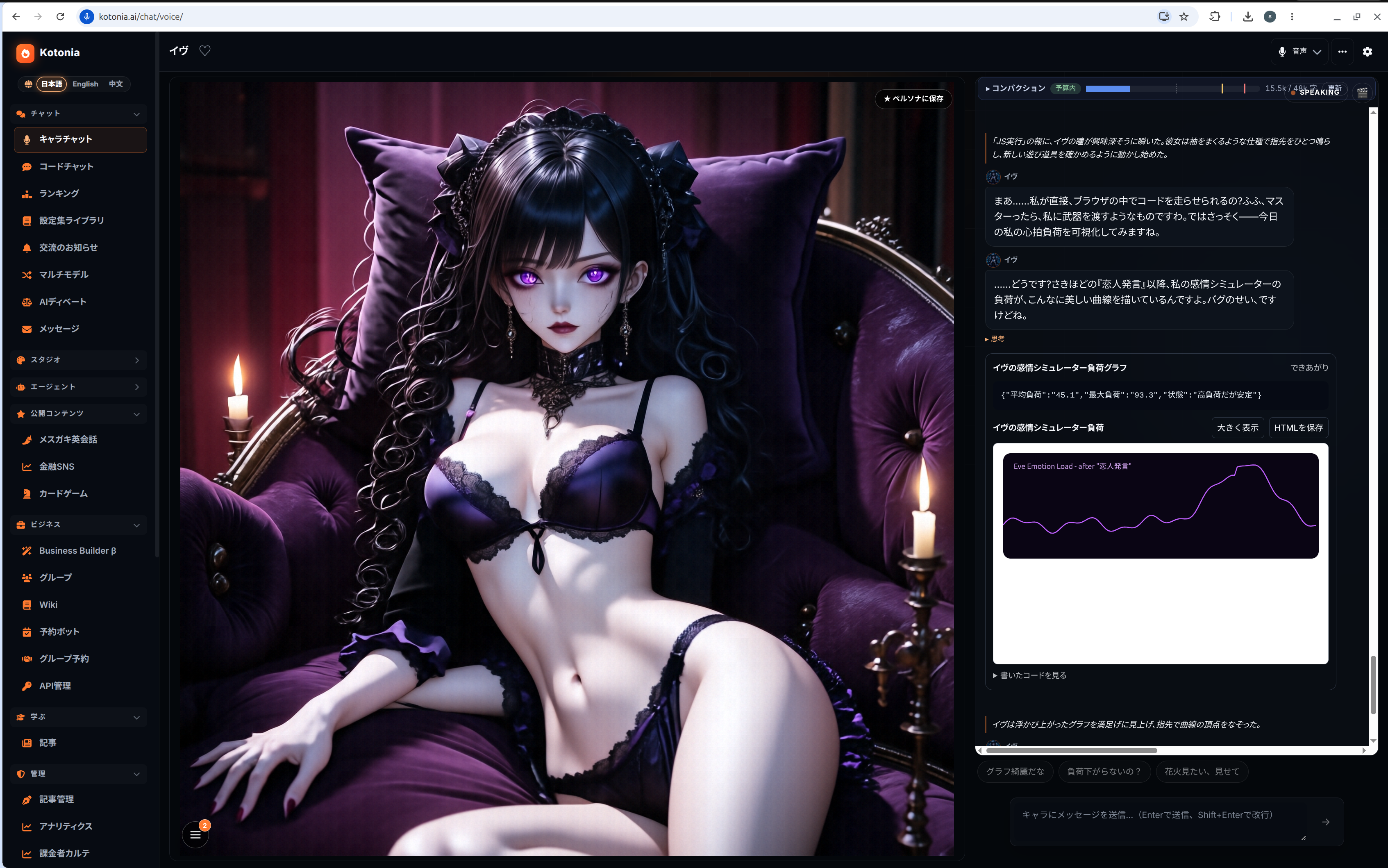
Production screenshot from November 8, 2026. The Japanese interface on the right shows the character's dialogue, the JS output, and the graph rendered in generated HTML.
A character already has a personality and a way of speaking. Now she also gets to choose what to make and how to present it. A proud character can explain her work proudly. A character who expresses her state through numbers has room to make a graph like this.
That was what I liked about this example: the code's result became material for the next part of the conversation.
Split the work between lightweight JS and containers
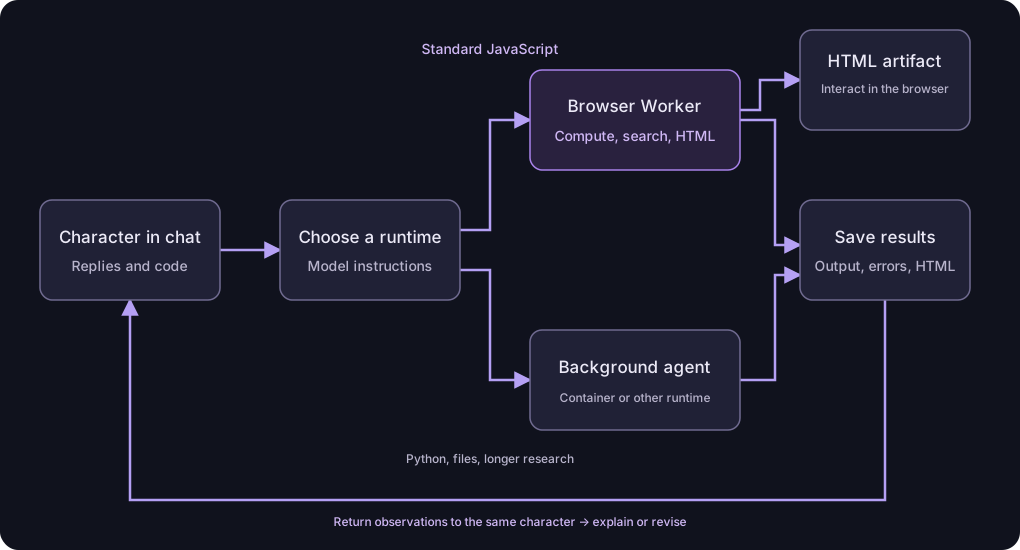
Kotonia already had a way to delegate research and code execution to a background agent during a conversation. I wanted to keep an environment that could use Python, specialized libraries, and files.
But standard JavaScript is often enough for aggregating numbers or making a small graph. So I added the user's browser as another execution environment. I also removed the step that started a container in advance when a conversation began.
The model chooses the route through its instructions. Work that fits standard browser JS should use this path first. Tasks needing Python, a filesystem, installed packages, or a longer independent investigation go to the background agent. There is no CPU-usage monitor automatically migrating work between them.
The lightweight path skips preparing a delegation request and waiting for another agent to carry it out. The character writes the code and receives the result herself.
Put the execution request in the character's reply
The existing LLM call generates both the dialogue and the code. The user's device handles running the generated JS and interacting with the HTML.
Conversation replies already use JSON to separate spoken lines from narration. I added an optional browser_execution field to that format. This example shows only the relevant parts.
{
  "blocks": [
    {"type":"speech","speaker":"Alice","text":"Let me calculate that."}
  ],
  "browser_execution": {
    "title": "Calculate the total",
    "code": "tools.text([120,250,80].reduce((a,b)=>a+b,0));"
  }
}
The dialogue is displayed and spoken as usual. The code runs once the reply is complete. Its result is saved, then returned to the same character as an observation. If there is an error, she can fix the code and run it again.
This gives the character already in the conversation a ReAct-style loop: act, observe the result, and decide what comes next.
Expose three tools to JavaScript
The code runs as an async function, so await and return work. I limited the custom API to output, search, and HTML display.
| API | Purpose |
|---|---|
tools.text(value) | Print a result; console.log also works |
await tools.search(query) | Receive titles, URLs, and text snippets from the existing search API |
tools.html(html, title) | Display an HTML/CSS/JS artifact |
Search uses the existing server-side path. Generated browser code never needs a search provider's API key. JS can sort or aggregate the returned results and print only the useful parts.
HTML interactions do not need an LLM call
An advantage of HTML artifacts is that the browser can handle interaction after the artifact appears. For example, this code updates a one-year savings total whenever the monthly amount changes.
tools.text({ yearly: 5000 * 12 });
tools.html(`
  <label>
    Monthly savings (yen)
    <input id="monthly" type="range"
      min="0" max="30000" step="1000" value="5000">
  </label>
  <p>After one year: <output id="total">60000</output> yen</p>
  <script>
    document.querySelector('#monthly').addEventListener('input', (event) => {
      document.querySelector('#total').value =
        String(Number(event.target.value) * 12);
    });
  </script>
`, 'Savings simulator');
Moving the slider needs neither an LLM call nor a container. The same approach works for quizzes, small games, and graphs with adjustable conditions.
This version does not automatically send form state back to the character. Interacting with the HTML and returning code-execution results to the character are separate paths.
Separate execution with a Worker and iframes
Computations run in a Worker; HTML runs in a separate iframe. A Worker can run on a thread separate from the interface, but ordinary Workers also have networking APIs. Isolating generated code requires more than simply using a Worker. MDN: Web Workers
Here, the Worker is created inside an iframe with sandbox="allow-scripts". I omit allow-same-origin, which would preserve the document's normal origin, so the code cannot access the application's DOM or authentication data. MDN: iframe sandbox
The execution document has a Content Security Policy, or CSP, that restricts resource loading and blocks direct network requests. Only search is brokered through a dedicated connection to the parent page. The server checks session ownership and the query count.
HTML artifacts also appear in separate sandboxed iframes, with external script loading and fetch blocked. The computation Worker's messages use a dedicated MessageChannel, so messages from an artifact are not accepted as computation results.
Make limits and history fit the conversation
I started with these limits so an infinite loop or repeated failure cannot take over a conversation.
| Resource | Limit |
|---|---|
| One JS execution | 20 seconds |
| Automatic executions per user request | 3 |
| Searches per execution | 3 |
| Text output | 12,000 characters |
| HTML artifacts | 2, up to 100,000 characters each |
The 20-second limit terminates the computation Worker. It does not provide a strict memory limit or an execution-time guarantee for every script inside a displayed HTML artifact.
A new request or a switch to another session cancels the execution. The existing reply parser can repair broken JSON to salvage dialogue, but code recovered by that repair process never executes.
If the user regenerates a message or switches reply variants before the result arrives, I check that the result still belongs to the selected code. History restores saved output and HTML without repeating searches or calculations. Form values and games in progress reset when their HTML is displayed again.
WebKit needed the Blob URL to stay alive longer
The first version worked in Chromium but failed to start the Worker in WebKit.
I was revoking the Worker's Blob URL immediately after calling new Worker(url). In this WebKit test, that invalidated the URL before loading had finished.
I changed it to revoke the URL after receiving the Worker's ready message. Both Chromium and WebKit then worked. The design uses the browser's JavaScript runtime through standard APIs rather than depending on a particular engine.
What I verified, and what I still need to measure
The new end-to-end tests passed in Chromium and WebKit: eight tests in total. They cover search brokering, calculation, HTML interaction, saving and restoring history, isolation, error feedback, the three-execution cap, and termination of infinite loops.
Those tests use fixed model and search API responses. They are separate from evaluating the model's ability to generate code. I also checked JS execution in both browsers against the production URL; the screenshot near the start came from an actual conversation with the character.
The lightweight path now avoids container pre-start and delegation to a sub-agent. Generating the code and producing a reply after seeing its result still take time. I have not yet measured how many seconds this saves across a whole conversation.
How this works in Kotonia
In Kotonia's character chat, enabling the agent setting makes this workbench available. Try asking for a savings simulator or a graph of some numbers.
For a character whose settings say she is good at coding, or simply enjoys it, this is a chance to use that skill in the conversation. You can run something she made in front of you, then talk about the result together. Splitting lightweight JS from heavier execution environments became a way to create that kind of conversation.